Delivered on time. Delivered early. Contacted before delivery. Friendly service. Well protected parcel. Left parcel in a safe place.
UPS 追蹤
融合的 受到推崇的
Automatic tracking software built for your carrier Get a free demo
*AfterShip provides package tracking services only. For inquiries about order details, please contact your retailer.
進階功能
如何追蹤 UPS 包裹?
使用 UPS 追蹤包裹
UPS official website
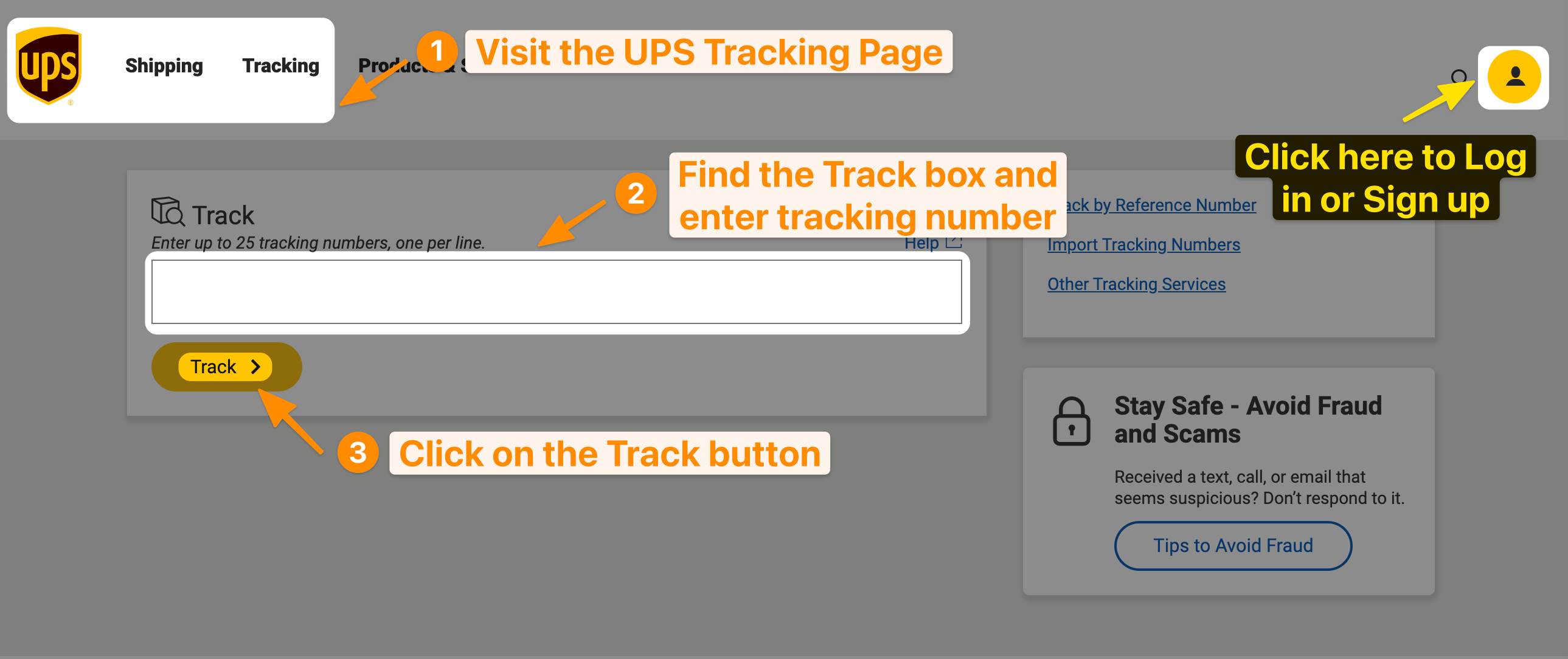
You can visit the official UPS website for package tracking. Don't worry, we will provide you with detailed instructions using text and visual diagram.- Find your UPS tracking number first.
- Visit the UPS Package Tracking Page.
- Find the right track box and enter up to 25 tracking numbers.
- Click on the “Track” button.
After Log in or Sign up your UPS account, you can also check your recently tracked shipments here.
UPS 行動應用程式
UPS 提供便利的包裹追蹤服務,讓您隨時隨地掌握包裹動態。按照以下步驟,即可開始使用 UPS 行動應用程式追蹤包裹。- 和之前一樣,請先取得追蹤號碼。
- 下載 UPS 行動應用程式,適用於 IOS(App Store)和 Android(Google Play)。
- 登入 UPS 帳戶,或註冊新帳戶。
- 在主畫面底部的選單中,點選「追蹤」。
- 輸入 UPS 追蹤號碼,即可查看追蹤詳細資訊。
您也可以前往設定 > 通知,開啟追蹤更新,以啟用 UPS 行動應用程式的推播通知。
UPS SMS
UPS 也提供 SMS 通知,讓您無須造訪網站或下載應用程式,就能查詢配送狀態。以下說明如何透過 SMS 追蹤 UPS 包裹:- 和之前一樣,請先取得追蹤號碼。
- 前往 UPS My Choice® 登入或註冊,以接收 SMS 配送通知。
- 透過 SMS,將 UPS 追蹤號碼傳送至 69877(美國客戶適用)。
- 接收 UPS 傳送的追蹤更新。
您也可以回覆其他指令以取得更多資訊(例如,回覆「Help」以取得更多客服協助,或回覆「Stop」以取消訂閱)。
UPS 電子郵件
只要寄送電子郵件,UPS 就會將貨件更新資訊直接傳送至您的收件匣。您可以依照以下步驟透過電子郵件追蹤 UPS 包裹:- 和之前一樣,請先取得追蹤號碼。
- 開啟電子郵件程式,撰寫新郵件並寄至 [email protected]。
- 將 UPS 追蹤號碼輸入電子郵件內文(請勿填在主旨欄)。
- 寄出郵件後,UPS 會回覆最新的貨件追蹤狀態。
UPS 電話
您也可以透過電話追蹤 UPS 包裹,快速查詢貨件狀態,或直接聯絡客服人員。在美國,請撥打 1-800-742-5877 (1-800-PICK-UPS)。如需查詢國際聯絡電話,請造訪 UPS 聯絡頁面。
UPS official website
You can visit the official UPS website for package tracking. Don't worry, we will provide you with detailed instructions using text and visual diagram.
- Find your UPS tracking number first.
- Visit the UPS Package Tracking Page.
- Find the right track box and enter up to 25 tracking numbers.
- Click on the “Track” button.
After Log in or Sign up your UPS account, you can also check your recently tracked shipments here.
UPS Mobile App
UPS offers a convenient way to track packages anytime, anywhere. You can follow these steps to start tracking with the UPS Mobile App.
- Just like before, you need to get your tracking number.
- Download the UPS Mobile App - available on IOS (App Store) and Android (Google Play).
- Log in or sign up your UPS account.
- Tap the “Track” button at the bottom menu on the home screen.
- Enter your UPS tracking number and view tracking details.
您也可以在 UPS 行動應用程式中前往 設定 > 通知,開啟追蹤狀態推播通知。
UPS SMS
UPS 也提供 SMS 通知,讓您無須造訪網站或下載應用程式,就能查詢配送狀態。以下說明如何透過 SMS 追蹤 UPS 包裹:
- 和之前一樣,請先取得追蹤號碼。
- 前往 UPS My Choice® 登入或註冊,接收 SMS 配送通知。
- 透過 SMS 將 UPS 追蹤號碼傳送至 69877(適用於美國客戶)。
- UPS 會回覆追蹤狀態更新。
您也可以回覆其他指令以取得更多資訊(例如,傳送「Help」取得更多客戶支援資訊,或傳送「Stop」取消訂閱)。
UPS 電子郵件
只要傳送電子郵件,UPS 就會將貨件更新直接寄到您的收件匣。以下說明如何透過電子郵件追蹤 UPS 包裹:
- 和之前一樣,請先取得追蹤號碼。
- 開啟電子郵件程式,撰寫新郵件並寄至 [email protected]。
- 將 UPS 追蹤號碼填入郵件內文(不要填在主旨欄)。
- 寄出郵件後,UPS 會回覆最新的追蹤狀態,並分別列出每件貨件的資訊。
UPS 電話追蹤
UPS 也提供電話包裹追蹤服務,方便您快速查詢包裹狀態或聯絡客服人員。在美國,請撥打 1-800-742-5877 (1-800-PICK-UPS)。如需查詢國際聯絡電話,請造訪 UPS 聯絡頁面。
使用 AfterShip 追蹤
AfterShip Package Tracking Page
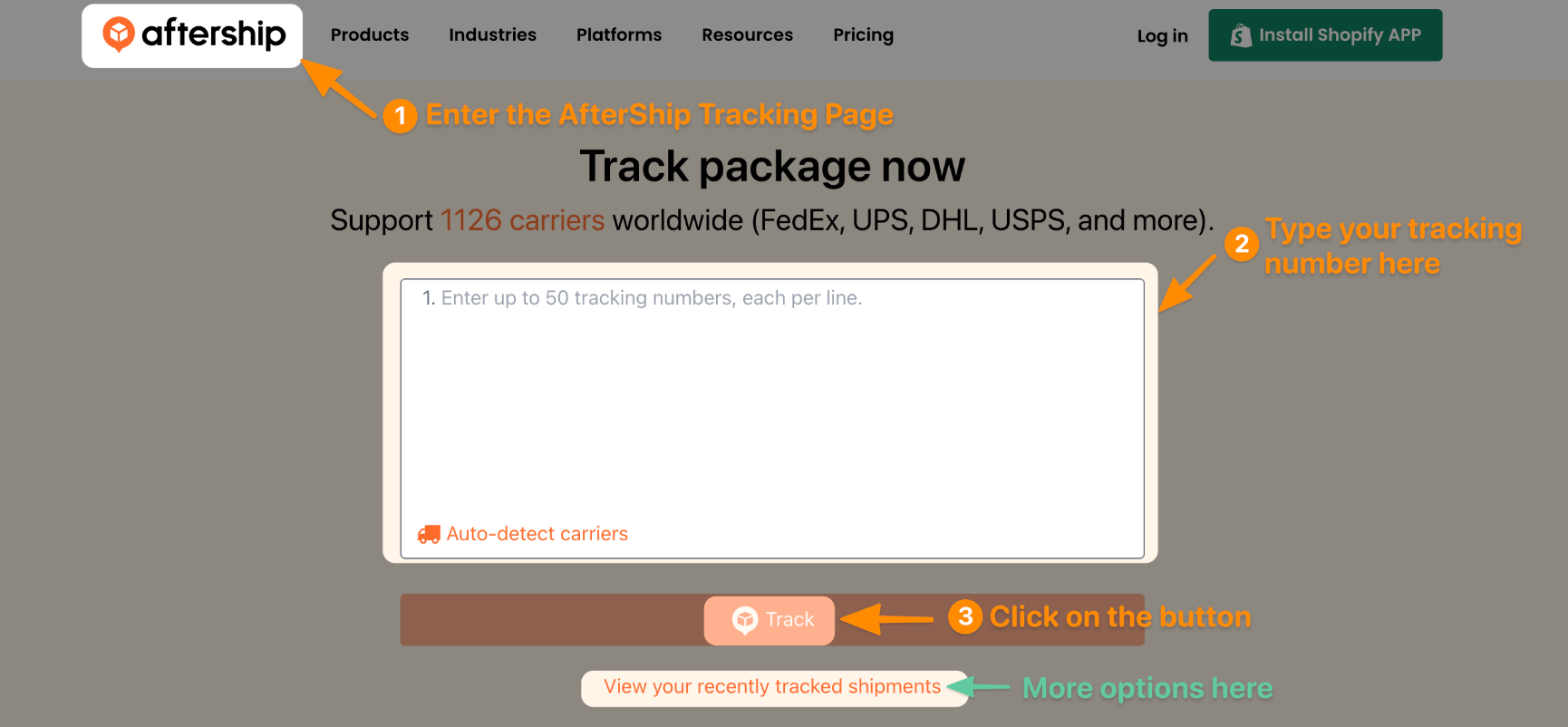
The AfterShip helps you track your packages with multiple carriers including UPS. Following these steps, you can effortlessly get updated information about your packages:- Find your UPS tracking number first.
- Go to the AfterShip Package Tracking Page for the search this time.
- In the designed input box, enter up to 50 tracking numbers, each per line.
- Click on the “Track” button and start processing.
A few seconds later, you can reviewed all updated information about your packages! Here's a simple diagram to guide you:
AfterShip Mobile App
The AfterShip Mobile App also helps you track packages from UPS and over 1,200+ global carriers. Here’s how to track your UPS package using the AfterShip Mobile App:- Just like before, you need to get your tracking number.
- Download AfterShip Mobile App - available on IOS (App Store) and Android (Google Play).
- Log in or sign up your AfterShip account.
- Tap the “Add Tracking” button and input the tracking number.
- AfterShip will automatically detect UPS as the carrier.
- Once the tracking number and carrier are added, AfterShip will display detailed status updates for your package.
To stay updated, you can enable push notifications for tracking updates on the AfterShip Mobile App. This means you’ll receive alerts when the status of your package changes.
AfterShip Package Tracking Page
The AfterShip helps you track your packages with multiple carriers including UPS. Following these steps, you can effortlessly get updated information about your packages:
- Find your UPS tracking number first.
- Go to the AfterShip Package Tracking Page for the search this time.
- In the designed input box, enter up to 50 tracking numbers, each per line.
- Click on the “Track” button and start processing.
A few seconds later, you can reviewed all updated information about your packages! Here's a simple diagram to guide you:
AfterShip Mobile App
The AfterShip Mobile App also helps you track packages from UPS and over 1,200+ global carriers. Here’s how to track your UPS package using the AfterShip Mobile App:
- 與之前相同,您需要先取得追蹤號碼。
- 下載 AfterShip 行動應用程式,適用於 iOS(App Store)和 Android(Google Play)。
- 登入或註冊您的 AfterShip 帳戶。
- 點選「新增 Tracking」按鈕,然後輸入追蹤號碼。
- AfterShip 會自動辨識 UPS 為承運商。
- 新增追蹤號碼和承運商後,AfterShip 會顯示包裹的詳細狀態更新。
若要隨時掌握最新狀態,您可以在 AfterShip 行動應用程式中開啟追蹤更新推播通知。包裹狀態一有變更,您就會收到提醒。
請在此選擇貨件類型,輸入貨件參考編號和日期範圍,即可取得貨件資訊。
如何找到 UPS 追蹤號碼?
UPS 追蹤號碼是追蹤包裹從寄出到送達狀態的重要資訊。追蹤號碼通常由寄件人或商家提供,您可以透過以下幾種方式找到:
- Shipping Confirmation Emails: After a purchase or shipment, you often receive a confirmation email from UPS or the seller. This email usually contains your tracking number.
- UPS Shipping Labels: If you have the physical package, the tracking number is printed on the shipping label—usually located near the barcode.
- Receipts or Invoices: Check your receipt or invoice (digital or paper) for tracking details, especially when shipping directly from a UPS Store or drop-off location.
- Online Retailer Account: For online purchases, log into your account on the retailer’s website. Navigate to your order history or order details page, where the tracking number should be listed alongside your recent orders.
- UPS Account: If you have registered for a UPS My Choice account, log in to view your incoming and outgoing shipments. Your account dashboard will display the tracking numbers for all associated packages.
- Contact the Sender: If you’re unable to locate your tracking number, reach out to the sender or merchant directly. They can provide the tracking number, as they have a record of the shipment.
What do my UPS Tracking Number look like?
The following formats are used for UPS tracking numbers:
- 1Z9999999999999999
- 999999999999
- T9999999999
- 999999999
UPS 也會追蹤其他類型的追蹤號碼,長度介於 7 至 20 個字元。這些號碼包括:
- 配送單或子 PRO 編號:用於追蹤零擔貨運(LTL)和整車貨運(TL)的子貨件。
- UPS 配送通知單:在部分國家的首次配送時提供的條碼通知,內含 12 位數的參考編號。
- UPS 服務通知單:在部分國家的首次配送時提供的通知。
- 分單空運提單:用於追蹤空運貨物。
- 分單海運提單:用於追蹤海運貨物。
- PRO 編號r:用於追蹤陸運貨物。
UPS 追蹤狀態代表什麼?
| 貨運標籤狀態 | 說明 |
|---|---|
| 標籤已建立 | 我們已收到寄件人提供的貨件詳細資料和帳單資訊。待我們收到貨件,且貨件開始在物流網絡中運送後,狀態便會更新。 |
| 已寄出/運送途中 | 我們已收到貨件,貨件目前正在物流網絡中運送,並已有預定送達日期。貨件可能會維持此狀態,直到開始最後配送為止。請注意,長途貨件在抵達目的地轉運中心前,可能不會有新的掃描紀錄。 |
| 配送中 | 當地 UPS 設施已收到貨件,並已交由司機進行最後配送。除非寄件人選擇指定送達時間的空運服務,否則住宅地址的包裹通常會在上午 9 點至晚上 7 點之間送達(偶爾會更晚),商業地址則會在營業時間結束前送達。 |
| 已送達 | 貨件已送達最終目的地,並記錄了送達時間。如果不需要簽名,司機會盡可能將貨件放在安全處,例如前門廊、側門、後門廊或車庫,避免貨件被看見並免受惡劣天氣影響。 |
| Label Status | Description |
|---|---|
| Delivered to a UPS Access Point | A selected UPS Access Point location has received the shipment and it is ready for pickup at the receiver's convenience. |
| Transferred to Post Office for Delivery | The sender requested the shipment to be transferred to the local post office for final delivery. Please allow an additional day or two for the delivery to be completed. |
| Exception | The shipment is within the UPS network; however, an unexpected error has occurred, which may result in a change to the scheduled delivery date. The reason for the exception will be specified in the Shipment Progress section of the Tracking Detail page. If the delivery date changes, the tracking status will display the new date. |
透過 AfterShip 接收即時追蹤通知
訂閱 AfterShip 或使用 AfterShip 行動應用程式,即可透過即時追蹤通知,隨時掌握包裹的配送進度。無論您是在等候個人包裹配送,還是管理商業出貨,AfterShip 都能確保您不會錯過任何更新。
UPS 需要多久才會更新追蹤資訊?
包裹在 UPS 系統中運送時,UPS 通常會即時更新追蹤資訊。一般而言,您可以預期以下情況:
- **即時掃描:**包裹會在重要節點進行掃描,例如起運地處理中心、轉運中心及送達時。掃描完成後,追蹤資訊會立即更新。
- 標準更新頻率: 一般情況下,每次掃描後幾小時內就會更新追蹤資訊,讓您能密切掌握包裹的運送進度。
- 旺季延遲: 假期等貨運量較大的時期,因貨件數量增加,追蹤資訊可能會稍晚更新。
- 地區差異: 鄉村或偏遠地區的更新頻率可能較低,掃描與追蹤資訊更新之間的間隔也可能較長。
- 營業日結束前後更新: 大多數追蹤資訊會在掃描後不久更新,但有些可能要到營業日結束時才會顯示,尤其是包裹正在主要處理中心之間運送時。
- 國際貨件: 跨境包裹需經過額外的海關程序,且涉及時區差異,因此追蹤資訊可能會較晚才反映最新狀態。
如何聯絡 UPS 處理問題?
如果您的 UPS 貨件遇到延誤、包裹遺失、配送異常或地址錯誤等問題,請直接聯絡 UPS 尋求協助。以下是聯絡 UPS 取得支援的最佳方式:
- 致電 UPS 客戶服務
- **美國國內:**1-800-742-5877 (1-800-PICK-UPS)
- **國際:**造訪 UPS 說明與支援頁面,查詢您所在國家/地區的聯絡電話。
- 透過 UPS 網站即時聊天
- 造訪 UPS Tracking 支援頁面。
- 點擊右下角的 「詢問 UPS」 按鈕,與 UPS 虛擬助理聯絡。
- Email 或線上支援表單
- 使用 UPS Email 支援表單,詢問貨件、帳單或索賠相關事宜。
- 透過 UPS My Choice 帳戶查詢
- 登入您的 UPS My Choice 帳戶,回報問題、申請變更配送安排,或直接針對追蹤中的包裹提出索賠。
- 前往 UPS 據點
- 透過 UPS 據點查詢工具尋找最近的 UPS Store 或 Access Point。
- 請備妥追蹤號碼及貨件詳細資料,以便更快獲得服務。
**美國境內:**1-800-742-5877 (1-800-PICK-UPS)
**國際:**請前往 UPS 說明與支援頁面,查詢您所在國家/地區的聯絡電話。
請前往 UPS Tracking 支援頁面。
按一下右下角的 「詢問 UPS」 按鈕,即可與 UPS 虛擬助理交談。
請填寫 UPS Email 支援表單,提交貨件、帳單或索賠相關問題。
登入您的 UPS My Choice 帳戶,回報問題、要求變更配送安排,或直接針對追蹤中的包裹提出索賠。
使用 UPS 門市查詢工具,尋找最近的 UPS Store 或 Access Point。
備妥追蹤號碼及貨件資料,可加快處理速度。
如何閱讀 UPS 配送通知?
請依照以下步驟,了解 UPS 配送通知內容:
- 追蹤您的包裹:輸入 UPS 配送通知單號或原始追蹤號碼,即可查詢包裹的配送進度,掌握包裹目前所在位置及可採取的後續措施。
- 查看配送資訊:查看配送員在通知單上勾選的方框,了解包裹目前的位置或下次配送日期。若包裹已改送至其他地址,或有特定配送需求,相關資訊也會列於此處。
- 授權免簽收放置包裹:您可以要求配送員下次配送時將包裹留置,無須由年滿 21 歲的成人簽收。請在通知單的指定欄位簽名,並將通知單放回配送員最初放置的位置,即表示您授權配送員免簽收放置包裹。
如何閱讀 UPS InfoNotice?
請依照以下步驟閱讀 UPS InfoNotice:
- 追蹤您的包裹:使用 UPS InfoNotice 編號或原始追蹤號碼,查詢包裹的追蹤資訊,確認包裹目前的位置,並了解您可以採取哪些必要措施。
- 查看配送詳情:查看配送司機在 InfoNotice 上勾選的方框,了解包裹所在位置或下次配送嘗試日期等重要資訊。如果包裹已改送至其他地址,或有特定配送要求,相關資訊也會列於此處。
- 允許司機留下包裹:如果您願意,可以要求司機下次配送時將包裹留下,無須年滿 19 歲的成人簽名。請在指定欄位簽署配送通知,並將通知放回司機最初留下通知的位置。完成後,即表示您授權司機無須取得簽名即可留下包裹。
關於 UPS
UPS 是 United Parcel Service 的縮寫,是一家享譽全球的物流與包裹配送公司。UPS 成立於 1907 年,總部位於喬治亞州亞特蘭大,現已發展成為全球規模最大、最具知名度的運輸公司之一。
UPS 的核心業務是提供包裹與文件的指定時限送達服務。服務涵蓋國內及國際運輸、貨運、供應鏈管理,以及專業物流解決方案。UPS 透過遍布各地的設施、車輛與技術系統,確保配送作業高效可靠。
國內、國際及其他服務
美國國內
UPS 是美國領先的小包裹限時保證送達服務供應商,提供全面的國內空運與陸運方案,並均附送達保證。此外,UPS 的陸運車隊可服務美國本土所有商業及住宅郵遞區號。
國際
UPS 的全球網絡遍及歐洲、亞太地區、加拿大、拉丁美洲及 ISMEA 地區,提供多種保證限時送達的國際運輸服務。UPS 提供的保證特快送達選項也比業界任何其他承運商都多。
供應鏈解決方案
UPS Supply Chain Solutions 提供貨運代理、整車貨運代理、物流與配送、UPS Capital 及其他專業服務。為因應供應鏈日益複雜的情況,UPS 整合運輸、配送、國際貿易及貨運代理服務,並搭配金融與資訊服務,提供整合式解決方案。這些供應鏈服務支援 UPS 在 200 多個國家和地區的全球營運。
服務類型
UPS 提供多種貨件及服務。AfterShip Tracking 支援追蹤以下 UPS 服務:
服務區域
UPS 在廣泛的國內及國際區域提供全面的運輸與物流服務。憑藉全球最廣泛的運輸網絡之一,UPS 可可靠配送至200 多個國家和地區。
美國境內服務涵蓋範圍
UPS 的服務涵蓋美國本土所有住宅與商業郵遞區號,包括:
一至五個工作日(UPS® Ground)
- UPS® Ground 可配送至美國全部 50 個州及波多黎各的企業與住宅地址。
第二或第三個工作日(例如 UPS 2nd Day Air® 或 UPS 3 Day Select®)
- UPS 2nd Day Air A.M.® 可配送至美國本土相連的 48 個州,以及阿拉斯加和夏威夷的部分地址。
- UPS 2nd Day Air 可配送至美國全部 50 個州及波多黎各;阿拉斯加和夏威夷部分地區除外。
- UPS 3 Day Select 可配送至美國本土相連的 48 個州。
次日送達(UPS Next Day Air®)
- UPS Next Day Air® Early 可配送至美國本土相連的 48 個州及阿拉斯加州安克拉治。
- UPS Next Day Air 可配送至美國全部 50 個州及波多黎各。
- UPS Next Day Air® Saver 可從美國全部 50 個州配送至美國本土相連的 48 個州。
UPS® Ground 可配送至美國全部 50 個州及波多黎各的企業與住宅地址。
UPS 2nd Day Air A.M.® 可配送至美國本土相連的 48 個州,以及阿拉斯加和夏威夷的部分地址。
UPS 2nd Day Air 可配送至美國全部 50 個州及波多黎各;阿拉斯加和夏威夷部分地區除外。
UPS 3 Day Select 可配送至美國本土相連的 48 個州。
UPS Next Day Air® Early 可配送至美國本土 48 州及阿拉斯加州安克拉治。
UPS Next Day Air 可配送至美國全部 50 州及波多黎各。
UPS Next Day Air® Saver 可從美國全部 50 州配送至美國本土 48 州。
國際服務涵蓋範圍
UPS 國際服務支援進口與出口貨件,並提供保證送達日期與時間的服務選項。主要服務範圍包括:
- 歐洲
- 亞太地區
- 加拿大和墨西哥
- 拉丁美洲、中東和非洲(ISMEA)
配送時效
美國國內服務
- 一至五個工作日(UPS® Ground):
依目的地而定,通常於 1 至 5 個工作日內送達;大多數住宅地址通常也提供週六配送服務。 - 第二或第三個工作日(例如 UPS 2nd Day Air® 或 UPS 3 Day Select®)
適合重要但不緊急的貨件,可於當日結束前送達,或於第二個工作日結束前送達;UPS 2nd Day Air® 和 UPS 3 Day Select® 均提供週六配送服務。 - 次日送達(UPS Next Day Air®)
緊急貨件可於下一個工作日早上、中午或當日結束前送達;UPS Next Day Air® Early 和 UPS Next Day Air 均提供週六配送服務。
國際服務
Most Urgent Shipments
- UPS Express Critical®: The same-day delivery service; you can order a shipment by calling 1-800-714-8779 from the U.S. and Canada or sending an email for [email protected].
One to Three Business Days
- UPS Worldwide Express Plus®: Typically delivered by 8:30 or 9:00 a.m.
- UPS Worldwide Express®: Typically delivered by 10:30 a.m. or noon
- UPS Worldwide Express Freight® Midday: Typically delivered by noon or 2:00 p.m.
- UPS Worldwide Express Freight®: Typically delivered by end of day
- UPS Worldwide Saver®: Typically delivered by end of day
Two to Five Business Days
- UPS Worldwide Expedited®: Typically delivered by end of day
Standard Shipping, Day-Definite
- UPS Standard®: Day definite, by end of day
Most Economical Cross-Border Option
- UPS Worldwide Economy (enrollment required): 5-12 business days
UPS Express Critical®: The same-day delivery service; you can order a shipment by calling 1-800-714-8779 from the U.S. and Canada or sending an email for [email protected].
UPS Worldwide Express Plus®: Typically delivered by 8:30 or 9:00 a.m.
UPS Worldwide Express®: Typically delivered by 10:30 a.m. or noon
UPS Worldwide Express Freight® Midday: Typically delivered by noon or 2:00 p.m.
UPS Worldwide Express Freight®: Typically delivered by end of day
UPS Worldwide Saver®: Typically delivered by end of day
UPS Worldwide Expedited®: Typically delivered by end of day
UPS Standard®: Day definite, by end of day
UPS Worldwide Economy (enrollment required): 5-12 business days
What are the differences between AfterShip and UPS?
While UPS provides the standard tracking services on the official website, tracking UPS packages through the AfterShip Package Tracking Page offers several advantages:
支援 1,200 多家承運商的跨承運商追蹤
輕鬆追蹤來自全球 1,200 多家承運商的貨件,不限於 UPS,還包括 FedEx、DHL、USPS、GLS 等。無須逐一造訪各承運商網站,即可簡化多家承運商的貨件追蹤作業。
整合電子商務平台
與 Shopify、Salesforce Commerce Cloud (SFCC)、WooCommerce、Magento、BigCommerce、Amazon Seller Central 等主要電子商務平台和市集無縫整合,自動更新追蹤資訊,提升購後體驗。
彈性滿足個人與企業需求
無論是個人消費者,還是經常處理來自不同來源大量包裹的賣家,都能適用。提供可彈性擴展的解決方案,滿足各種配送需求,不受承運商限制。
- For individuals: Track all packages—regardless of the carrier or online store—in one place using AfterShip Package Tracking Page or Mobile App. AfterShip makes it easy to read and understand tracking details and receive real-time package status update notifications.
- For sellers: AfterShip supports multi-channel retailers, marketplaces, and logistics teams. With powerful tracking API and webhook, sellers can deliver a seamless post-purchase experience and scale operations effortlessly.
Why track and integrate UPS packages with AfterShip?
✅ Support for any shipment worldwide with full coverage
Easily track any shipments from parcel, trucking, freight, postal, express, and 3PL carriers worldwide, ensuring comprehensive coverage whether you’re monitoring a single delivery or orders from multiple logistics providers.
✅ Carrier auto-detection by tracking number
The package tracking page automatically detects the shipping carrier through seamless integrations, ensuring accurate identification based on tracking number format to avoid manually selecting the courier and eliminate any guesswork.
✅ Detailed package status notifications for complete tracking visibility
隨時掌握包裹配送流程的每個階段,包括資訊已接收、運送中、派送中、可供取件、派送嘗試失敗、已送達、待處理、已過期及異常,所有資訊皆清楚呈現,讓您全面掌握配送進度。
✅ AI 精準預測送達日期
查看 AI 預測的送達日期。系統會根據承運商可靠度、配送路線及配送表現進行計算,預測準確度最高可達 95%,協助您妥善安排收件時間,並減少對配送時程的不確定性。
✅ Email 狀態變更通知,隨時掌握最新進度
包裹狀態每次變更時,您都會收到自動電子郵件通知,無須不斷查看頁面或手動重新整理,也能掌握最新進度。
✅ 批次追蹤,高效管理包裹
輸入多組追蹤號碼,即可一次追蹤最多 50 件包裹,輕鬆在同一處掌握所有貨件的配送狀況。
✅ 串接 1,200 多家全球承運商,全面追蹤包裹
輕鬆查看來自 1,200 多家國際承運商的追蹤資訊,包括 FedEx、UPS、DHL、USPS 等,讓您安心追蹤全球幾乎所有包裹。
✅ 多語言追蹤支援,暢通全球溝通
追蹤介面支援 30 多種語言,包括英文、西班牙文、法文、德文、日文和義大利文,讓您輕鬆以偏好的語言追蹤包裹。
UPS 顧客評論
4.61 78,853 ratings
5
4
3
2
1
Delivered on time. Friendly service. Delivered early. Left parcel in a safe place. Well protected parcel. Contacted before delivery.
Delivered on time.
常見問題
什麼是 UPS My Choice®?
UPS My Choice® is a service provided by UPS that helps you avoid missed deliveries and stay informed about your incoming packages. With UPS My Choice, you can receive timely alerts regarding your packages, including information about the delivery window. Additionally, this service allows you to view photo proof of delivery and gives you the flexibility to reschedule multiple packages simultaneously.
UPS 國際運送需要多久時間?
UPS offer a reliable delivery service with different options based on your needs. If you are shipping within the United States, we guarantee delivery within 1-2 business days. For international destinations, you can expect your package to arrive within 2-4 business days by the end of the day.
If time is not a constraint and your shipment is not urgent, our standard economy solution might be suitable for you. This option calculates the delivery time based on the distance, and typically takes up to six business days.
我如何取得我的貨件/包裹的照片?
You can view your photos of packages in the delivery confirmation email, UPS Tracking Page, auto notification and thr UPS My Choice® dashboard.
透過 AfterShip 改善整個售後體驗


整合 UPS 與多承運商追蹤 API
輕鬆將貨件追蹤整合到您的系統或網站中,以獲得無縫的追蹤體驗。 AfterShip 的追蹤 API 可讓您跨多個接觸點提供貨運可見性,而無需佔用您的開發資源。- 全球涵蓋:1,100 多家營運商整合和 52 多種語言
- 準確性:資料歸一化,標準化7個主狀態33個子狀態
- 資料完整性:人工智慧有助於識別新的追蹤號碼模式
- 正常運作時間和可靠性:正常運作時間超過 99.99%,符合 ISO 27001、SOC2 和 GDPR 合規性

因卓越的服務而獲得客戶認可